ege.dev

Wednesday, 21 July 2021

Cluster Statuses in Percona Kubernetes Operators

In Kubernetes, all resources have a status field separated from their spec. The status field is an interface both for humans or applications to read the perceived state of the resource.

When you deploy our Percona Kubernetes Operators – Percona Operator for MongoDB or Percona Operator for MySQL – in your Kubernetes cluster, you’re creating a custom resource (CR for short) and it has its own status, too. Since Kubernetes operators mimic the human operator and aim to have the required expertise to run software in a Kubernetes cluster; the status of the custom resources should be smart.

You can get cluster status with the commands below, or via (Kubernetes API) for Percona Operator for MySQL:

% kubectl get pxc
NAME            ENDPOINT                                   STATUS   PXC   PROXYSQL   HAPROXY   AGE
lisette-18537   lisette-18537-haproxy.subjectivism-22940   ready    3                3         87m

% kubectl get pxc <cluster-name> -o jsonpath='{.status}'
{
  "backup": {
    "version": "8.0.23"
  },
  "conditions": [
    {
      "lastTransitionTime": "2021-07-12T13:13:46Z",
      "status": "True",
      "type": "initializing"
    }
  ],
  "haproxy": {
    "labelSelectorPath": "...",
    "ready": 3,
    "size": 3,
    "status": "ready"
  },
  "host": "lisette-18537-haproxy.subjectivism-22940",
  "logcollector": {
    "version": "1.8.0"
  },
  "observedGeneration": 2,
  "pmm": {
    "version": "2.12.0"
  },
  "proxysql": {},
  "pxc": {
    "image": "percona/percona-xtradb-cluster:8.0.22-13.1",
    "labelSelectorPath": "...",
    "ready": 2,
    "size": 3,
    "status": "initializing",
    "version": "8.0.22-13.1"
  },
  "ready": 5,
  "size": 6,
  "state": "initializing"
}

And for Percona Operator for MongoDB:

% kubectl get psmdb
NAME             ENDPOINT                                                     STATUS   AGE
cynodont-26997   cynodont-26997-mongos.subjectivism-22940.svc.cluster.local   ready    85m


% kubectl get psmdb <cluster-name> -o jsonpath='{.status}'
{
  "conditions": [
    {
      "lastTransitionTime": "2021-07-12T13:13:39Z",
      "status": "True",
      "type": "initializing"
    }
  ],
  "host": "cynodont-26997-mongos.subjectivism-22940.svc.cluster.local",
  "mongoImage": "percona/percona-server-mongodb:4.4.6-8",
  "mongoVersion": "4.4.6-8",
  "mongos": {
    "ready": 1,
    "size": 3,
    "status": "initializing"
  },
  "observedGeneration": 2,
  "ready": 3,
  "replsets": {
    "cfg": {
      "ready": 1,
      "size": 3,
      "status": "initializing"
    },
    "rs0": {
      "initialized": true,
      "ready": 2,
      "size": 3,
      "status": "initializing"
    }
  },
  "size": 6,
  "state": "initializing"
}

As you can see there are several fields in the output: conditions, cluster size, number of ready cluster members, statuses and versions of different components, and the “state”. In the following sections, we’ll take a look at every possible value of the state field.

Initializing

While the cluster is progressing to readiness, CR status is “initializing”. It includes creating the cluster, scaling it up or down, and updating the CR that triggers a rolling restart of pods (for instance updating Percona Operator for MySQL memory limits).

Percona Operator for MongoDB also reconfigures the replica set config if necessary (for instance it adds the new pods as members to replset or removes terminated ones). Replica set in MongoDB is a set of servers that implements replication and automatic failover. Although they have the same name, it’s different from the Kubernetes replica set. While this configuration is happening or if there is an unknown/unpredicted error during it, the status is also “initializing”.

Since version 1.7.0, the Percona Operator for MySQL can handle full crash recovery if necessary. If a pod waits for the recovery, the cluster status is “initializing”.

Ready

The operator keeps track of the status of each component in the cluster. Percona Operator for MongoDB has the following components:

  1. mongod StatefulSet
  2. configsvr StatefulSet if sharding is enabled
  3. mongos Deployment if sharding is enabled

Percona Operator for MySQL components:

  1. PXC StatefulSet
  2. HAProxy StatefulSet if enabled
  3. ProxySQL StatefulSet if enabled

All components need to be in “ready” status for CR to be “ready”. If the number of ready pods controlled by the stateful set reaches the desired number, the operator marks the component as ready. The readiness of the pods is tracked by Kubernetes using readiness probes for each container in the pod. For example, for a Percona XtraDB Cluster container to be ready “wsrep_cluster_status” needs to be “Primary” and “wsrep_local_state” should be “Synced” or “Donor”. For a Percona Server for MongoDB container to be ready, accepting TCP connections on 27017 is enough.

But ready as the CR status means more than that. CR “ready” means the cluster (Percona Server for MongoDB or Percona XtraDB Cluster) is up and running and ready to receive traffic. So, even if all components are ready, the cluster status can be “initializing”. In the Percona Operator for MongoDB, the replica set needs to be initialized and its config up-to-date. Also, with the 1.9.0 release of both operators, the load balancer needs to be ready if the cluster is exposed with exposeType: LoadBalancer.

Stopping

Version 1.9.0 introduced two new statuses:

  1. Stopping
  2. Paused

Stopping means the cluster is paused or deleted and its pods are terminating right now.

If you run kubectl delete psmdb <cluster-name> or `kubectl delete pxc `` the resource can be deleted quickly without a chance to see “stopping” status. If you had finalizers (for example “delete-pxc-pods-in-order” in Percona Operator for MySQL) deletion will be blocked until the finalizer list is exhausted and you can observe “stopping” status.

Paused

Once the cluster is paused and all pods are terminated, the CR status becomes “paused”.

To pause the cluster: kubectl patch <psmdb|pxc> <cluster-name> --type=merge -p '{"spec": {"pause": true}}'

Keep in mind, when the cluster is paused and exposeType is LoadBalancer – Load balancers are still there and you continue to pay for them.

Error

Before 1.9.0, “error” status could mean two different things:

  1. An error occurred in the operator during the reconciliation of the CR
  2. One or more pods in a component are not schedulable

With 1.9.0, the “error” status means only the operator errors. If there is an unschedulable pod, the cluster’s status will be initializing. If the cluster is stuck in initializing for too long, it’s better to check the operator logs to investigate.

% kubectl logs <operator-pod-name>
...
{"level":"info","ts":1626095618.9982307,"logger":"controller_psmdb","msg":"Created a new mongo key","Request.Namespace":"subjectivism-22940","Request.Name":"cynodont-26997","KeyName":"cynodont-26997-mongodb-keyfile"}
{"level":"info","ts":1626095619.0032709,"logger":"controller_psmdb","msg":"Created a new mongo key","Request.Namespace":"subjectivism-22940","Request.Name":"cynodont-26997","KeyName":"cynodont-26997-mongodb-encryption-key"}
{"level":"info","ts":1626095687.3783236,"logger":"controller_psmdb","msg":"initiating replset","replset":"rs0","pod":"cynodont-26997-rs0-1"}
{"level":"info","ts":1626095694.020591,"logger":"controller_psmdb","msg":"replset was initialized","replset":"rs0","pod":"cynodont-26997-rs0-1"}
{"level":"error","ts":1626095694.622869,"logger":"controller_psmdb","msg":"failed to reconcile cluster","Request.Namespace":"subjectivism-22940","Request.Name":"cynodont-26997","replset":"rs0","error":"undefined state of the replset member cynodont-26997-rs0-0.cynodont-26997-rs0.subjectivism-22940.svc.cluster.local:27017: 6","errorVerbose":"undefined state of the replset member cynodont-26997-rs0-0.cynodont-26997-rs0.subjectivism-22940.svc.cluster.local:27017: 6\ngithub.com/percona/percona-server-mongodb-operator/pkg/controller/perconaservermongodb.(*ReconcilePerconaServerMongoDB).reconcileCluster\n\t/go/src/github.com/percona/percona-server-mongodb-operator/pkg/controller/perconaservermongodb/mgo.go:210\ngithub.com/percona/percona-server-mongodb-operator/pkg/controller/perconaservermongodb.(*ReconcilePerconaServerMongoDB).Reconcile\n\t/go/src/github.com/percona/percona-server-mongodb-operator/pkg/controller/perconaservermongodb/psmdb_controller.go:449\nsigs.k8s.io/controller-runtime/pkg/internal/controller.(*Controller).reconcileHandler\n\t/go/src/github.com/percona/percona-server-mongodb-operator/vendor/sigs.k8s.io/controller-runtime/pkg/internal/controller/controller.go:256\nsigs.k8s.io/controller-runtime/pkg/internal/controller.(*Controller).processNextWorkItem\n\t/go/src/github.com/percona/percona-server-mongodb-operator/vendor/sigs.k8s.io/controller-runtime/pkg/internal/controller/controller.go:232\nsigs.k8s.io/controller-runtime/pkg/internal/controller.(*Controller).worker\n\t/go/src/github.com/percona/percona-server-mongodb-operator/vendor/sigs.k8s.io/controller-runtime/pkg/internal/controller/controller.go:211\nk8s.io/apimachinery/pkg/util/wait.JitterUntil.func1\n\t/go/src/github.com/percona/percona-server-mongodb-operator/vendor/k8s.io/apimachinery/pkg/util/wait/wait.go:152\nk8s.io/apimachinery/pkg/util/wait.JitterUntil\n\t/go/src/github.com/percona/percona-server-mongodb-operator/vendor/k8s.io/apimachinery/pkg/util/wait/wait.go:153\nk8s.io/apimachinery/pkg/util/wait.Until\n\t/go/src/github.com/percona/percona-server-mongodb-operator/vendor/k8s.io/apimachinery/pkg/util/wait/wait.go:88\nruntime.goexit\n\t/usr/local/go/src/runtime/asm_amd64.s:1371","stacktrace":"github.com/go-logr/zapr.(*zapLogger).Error\n\t/go/src/github.com/percona/percona-server-mongodb-operator/vendor/github.com/go-logr/zapr/zapr.go:128\ngithub.com/percona/percona-server-mongodb-operator/pkg/controller/perconaservermongodb.(*ReconcilePerconaServerMongoDB).Reconcile\n\t/go/src/github.com/percona/percona-server-mongodb-operator/pkg/controller/perconaservermongodb/psmdb_controller.go:451\nsigs.k8s.io/controller-runtime/pkg/internal/controller.(*Controller).reconcileHandler\n\t/go/src/github.com/percona/percona-server-mongodb-operator/vendor/sigs.k8s.io/controller-runtime/pkg/internal/controller/controller.go:256\nsigs.k8s.io/controller-runtime/pkg/internal/controller.(*Controller).processNextWorkItem\n\t/go/src/github.com/percona/percona-server-mongodb-operator/vendor/sigs.k8s.io/controller-runtime/pkg/internal/controller/controller.go:232\nsigs.k8s.io/controller-runtime/pkg/internal/controller.(*Controller).worker\n\t/go/src/github.com/percona/percona-server-mongodb-operator/vendor/sigs.k8s.io/controller-runtime/pkg/internal/controller/controller.go:211\nk8s.io/apimachinery/pkg/util/wait.JitterUntil.func1\n\t/go/src/github.com/percona/percona-server-mongodb-operator/vendor/k8s.io/apimachinery/pkg/util/wait/wait.go:152\nk8s.io/apimachinery/pkg/util/wait.JitterUntil\n\t/go/src/github.com/percona/percona-server-mongodb-operator/vendor/k8s.io/apimachinery/pkg/util/wait/wait.go:153\nk8s.io/apimachinery/pkg/util/wait.Until\n\t/go/src/github.com/percona/percona-server-mongodb-operator/vendor/k8s.io/apimachinery/pkg/util/wait/wait.go:88"}
% kubectl logs <operator-pod-name>
 
...
{"level":"info","ts":1626095618.9982307,"logger":"controller_psmdb","msg":"Created a new mongo key","Request.Namespace":"subjectivism-22940","Request.Name":"cynodont-26997","KeyName":"cynodont-26997-mongodb-keyfile"}
{"level":"info","ts":1626095619.0032709,"logger":"controller_psmdb","msg":"Created a new mongo key","Request.Namespace":"subjectivism-22940","Request.Name":"cynodont-26997","KeyName":"cynodont-26997-mongodb-encryption-key"}
{"level":"info","ts":1626095687.3783236,"logger":"controller_psmdb","msg":"initiating replset","replset":"rs0","pod":"cynodont-26997-rs0-1"}
{"level":"info","ts":1626095694.020591,"logger":"controller_psmdb","msg":"replset was initialized","replset":"rs0","pod":"cynodont-26997-rs0-1"}
{"level":"error","ts":1626095694.622869,"logger":"controller_psmdb","msg":"failed to reconcile cluster","Request.Namespace":"subjectivism-22940","Request.Name":"cynodont-26997","replset":"rs0","error":"undefined state of the replset member cynodont-26997-rs0-0.cynodont-26997-rs0.subjectivism-22940.svc.cluster.local:27017: 6","errorVerbose":"undefined state of the replset member cynodont-26997-rs0-0.cynodont-26997-rs0.subjectivism-22940.svc.cluster.local:27017: 6\ngithub.com/percona/percona-server-mongodb-operator/pkg/controller/perconaservermongodb.(*ReconcilePerconaServerMongoDB).reconcileCluster\n\t/go/src/github.com/percona/percona-server-mongodb-operator/pkg/controller/perconaservermongodb/mgo.go:210\ngithub.com/percona/percona-server-mongodb-operator/pkg/controller/perconaservermongodb.(*ReconcilePerconaServerMongoDB).Reconcile\n\t/go/src/github.com/percona/percona-server-mongodb-operator/pkg/controller/perconaservermongodb/psmdb_controller.go:449\nsigs.k8s.io/controller-runtime/pkg/internal/controller.(*Controller).reconcileHandler\n\t/go/src/github.com/percona/percona-server-mongodb-operator/vendor/sigs.k8s.io/controller-runtime/pkg/internal/controller/controller.go:256\nsigs.k8s.io/controller-runtime/pkg/internal/controller.(*Controller).processNextWorkItem\n\t/go/src/github.com/percona/percona-server-mongodb-operator/vendor/sigs.k8s.io/controller-runtime/pkg/internal/controller/controller.go:232\nsigs.k8s.io/controller-runtime/pkg/internal/controller.(*Controller).worker\n\t/go/src/github.com/percona/percona-server-mongodb-operator/vendor/sigs.k8s.io/controller-runtime/pkg/internal/controller/controller.go:211\nk8s.io/apimachinery/pkg/util/wait.JitterUntil.func1\n\t/go/src/github.com/percona/percona-server-mongodb-operator/vendor/k8s.io/apimachinery/pkg/util/wait/wait.go:152\nk8s.io/apimachinery/pkg/util/wait.JitterUntil\n\t/go/src/github.com/percona/percona-server-mongodb-operator/vendor/k8s.io/apimachinery/pkg/util/wait/wait.go:153\nk8s.io/apimachinery/pkg/util/wait.Until\n\t/go/src/github.com/percona/percona-server-mongodb-operator/vendor/k8s.io/apimachinery/pkg/util/wait/wait.go:88\nruntime.goexit\n\t/usr/local/go/src/runtime/asm_amd64.s:1371","stacktrace":"github.com/go-logr/zapr.(*zapLogger).Error\n\t/go/src/github.com/percona/percona-server-mongodb-operator/vendor/github.com/go-logr/zapr/zapr.go:128\ngithub.com/percona/percona-server-mongodb-operator/pkg/controller/perconaservermongodb.(*ReconcilePerconaServerMongoDB).Reconcile\n\t/go/src/github.com/percona/percona-server-mongodb-operator/pkg/controller/perconaservermongodb/psmdb_controller.go:451\nsigs.k8s.io/controller-runtime/pkg/internal/controller.(*Controller).reconcileHandler\n\t/go/src/github.com/percona/percona-server-mongodb-operator/vendor/sigs.k8s.io/controller-runtime/pkg/internal/controller/controller.go:256\nsigs.k8s.io/controller-runtime/pkg/internal/controller.(*Controller).processNextWorkItem\n\t/go/src/github.com/percona/percona-server-mongodb-operator/vendor/sigs.k8s.io/controller-runtime/pkg/internal/controller/controller.go:232\nsigs.k8s.io/controller-runtime/pkg/internal/controller.(*Controller).worker\n\t/go/src/github.com/percona/percona-server-mongodb-operator/vendor/sigs.k8s.io/controller-runtime/pkg/internal/controller/controller.go:211\nk8s.io/apimachinery/pkg/util/wait.JitterUntil.func1\n\t/go/src/github.com/percona/percona-server-mongodb-operator/vendor/k8s.io/apimachinery/pkg/util/wait/wait.go:152\nk8s.io/apimachinery/pkg/util/wait.JitterUntil\n\t/go/src/github.com/percona/percona-server-mongodb-operator/vendor/k8s.io/apimachinery/pkg/util/wait/wait.go:153\nk8s.io/apimachinery/pkg/util/wait.Until\n\t/go/src/github.com/percona/percona-server-mongodb-operator/vendor/k8s.io/apimachinery/pkg/util/wait/wait.go:88"}

You can try new statuses in version 1.9.0 of both Percona Operator for MongoDB and Percona Operator for MySQL. Percona Operator for MongoDB was released in June and Percona Operator for MySQL is on the way.
Friday, 13 November 2020

Kubernetes Resource Management

I had the chance to listen to Bekir Doğan’s presentation, a former Kartaca employee, at an event in 2017. I was very impressed when I heard that they set up and distribute all the services they manage with OpenVZ in containers in 2005. Was anyone really into this type of thing?

Apparently, yes. Since the early 2000s, most of the industry and the Linux community have been trying to make containers into what they are today. In particular, Google has been a pioneer in making containers mainstream with its contributions. You might have thought of Kubernetes right away, but this time I’m talking about cgroups technology.

A brief introduction to cgroups

It is easy to mistake a container for the entire system’s sole owner since it isolates a group of processes and runs on the same core with other containers and applications instead of virtualizing the whole system. An aggressively resource-consuming container can also destabilize the fellow containers, making the system unstable.

To prevent this, we can allocate the entire system to a container using virtualization, but this will waste resources most of the time. For example, in Borg’s design documents, maximum utilization of resources is stated as one of the project’s main objectives.

At this point, cgroups comes into play.

Google engineers started developing cgroups in 2006, and it was included in Linux 2.6.24 in 2008. It is a disruptive feature that shaped the ecosystem with the domino effect it creates.

With the inclusion of the code in Linux, system administrators can group the system’s processes/tasks and subject them to common constraints. Process priorities and resource limits can be configured and included in the accounting. Moreover, this kernel capability paved the way for software that radically changed system management such as LXC and later Docker.

Here is a small cgroups demo for you:

To summarize the demo;

  1. We create a control group called fibtest.
  2. Within the group we create, we run a small C application called fibtest. This application generates Fibonacci sequences continuously.
  3. With systemd-cgtop, we monitor resource consumption in all groups in the system.
  4. The real story starts here. Inside the group, we change two values: cpu.cfs_period_us and cpu.cfs_quota_us. While determining how many microseconds each CPU period will last (50000) with cfs_period_us, with cfs_quota_us, we determine the maximum number of microseconds the program can use in each period (1000). Long story short, we choke the program.
  5. We take back the values, and fibtest breathes again.

You can also get the cgcreate and cgexec tools we used in the demo by installing cgroup-tools in Ubuntu 18.04, and libcgroup-tools in Fedora 32.

Kubernetes and cgroups

By default, system programs and containers run competitively on the machine resources. The containers’ resource consumption can make the machine unstable if no resources are allocated for system operations.

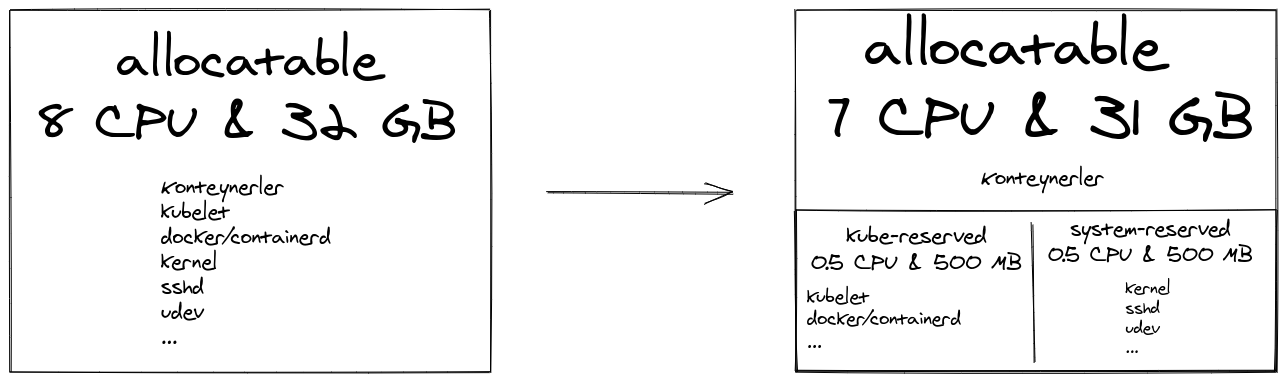
Kubernetes also provides resource isolation for system and user processes with cgroups. A cgroup called kubepods is created on every machine (if it doesn’t already exist). For the Kubernetes system and services, the cgroup is not created automatically; system administrators need to reconfigure kubelet.

apiVersion: kubelet.config.k8s.io/v1beta1
kind: KubeletConfiguration
systemReserved:
  cpu: 500m
  memory: 500M
kubeReserved:
  cpu: 500m
  memory: 500M

Allocatable

$ kubectl describe node
...
Capacity:
  attachable-volumes-gce-pd:  127
  cpu:                        8
  ephemeral-storage:          47259264Ki
  hugepages-2Mi:              0
  memory:                     30879764Ki
  pods:                       110
Allocatable:
  attachable-volumes-gce-pd:  127
  cpu:                        7
  ephemeral-storage:          18858075679
  hugepages-2Mi:              0
  memory:                     29831188Ki
  pods:                       110
...

Capacity shows the total resources seen by Kubernetes in the machine, and Allocatable shows the total resources allocated to user pods.

Resource requests and limits

Two concepts immediately appear in Kubernetes resource management: resource request and resource limit.

Resource request is taken into account by the scheduler for placing pods on machines. As long as there is enough space in the resource allocated to the user pods, the pod is assigned to a machine. Once the pod is assigned to a machine, kubelet guarantees that the container can always use the requested resource. “Pending” status means that the pod is waiting to be assigned. Every pod’s lifecycle includes a “Pending” status; however, if a pod spends a long time in this situation, it is useful to review its resource request. It consists of the sum of the requests of the containers within the source request of a pod.

It is crucial to define resource requests for each container to efficiently benefit from user pods’ total resources. The scheduler checks whether the machine’s available capacity is higher than the pods’ entire resource request while assigning the pods. In practice, even if the pods in the machine consume fewer resources than their request, if the sum of their requests is equal to the available resources, no new pods are assigned to this machine. Because, as I mentioned above, the source requested by the container is always guaranteed by kubelet.

Resource limit is taken into account by kubelet to prevent a pod from consuming all the system resources.

A container can consume more resources than it requests. However, if it consumes more memory than its request and the machine runs low on memory, it will be evicted.

What happens to a container that consumes more than its limit depends on the respective resource:

  • If the memory limit is exceeded, the container can be terminated and restarted if possible.
  • If the CPU limit is exceeded, the container is not terminated; only the CPU usage is throttled.

In practice, the total resource request of all containers on the machine cannot exceed the resource allocated to user pods; however, the sum of resource limits may be well above the available resources.

The total resource limit can exceed the maximum resource limit, just as the aircraft companies sell extra tickets and do overbooking. In this case, it will be more important to allocate resources for the system and Kubernetes processes, as I explained above.

Namespace level resource management

If you use Kubernetes namespaces to separate your services or environments (such as test, qa), you can set predefined resource requests and limits for each namespace. Therefore you can use default values for each container without configuring the resources separately.

For the default resource configuration, it is necessary to define a LimitRange:

apiVersion: v1
kind: LimitRange
metadata:
  name: qa-limitrange
spec:
  limits:
  - default:
      cpu: 1
      memory: 512Mi
    defaultRequest:
      cpu: 500m
      memory: 256Mi
    type: Container


$ kubectl describe limits
Name:       qa-limitrange
Namespace:  qa
Type        Resource  Min  Max  Default Request  Default Limit  Max Limit/Request Ratio
----        --------  ---  ---  ---------------  ------------- -----------------------
Container   cpu       -    -    500m             1              -
Container   memory    -    -    256Mi            512Mi          -

Since we are dealing with so many YAML files enough to experience minor crying outbursts during the day, it is desirable to write four lines less in each file. However, LimitRange does more than that. Especially in multi-tenant Kubernetes clusters, we can define LimitRange to approve resource requests and limits.

apiVersion: v1
kind: LimitRange
metadata:
  name: dev-limitrange
spec:
  limits:
  - max:
      cpu: 2
      memory: 1Gi
    min:
      cpu: 1
      memory: 500Mi
    type: Container


$ kubectl describe limits
Name:       dev-limitrange
Namespace:  dev
Type        Resource  Min    Max  Default Request  Default Limit  Max Limit/Request Ratio
----        --------  ---    ---  ---------------  ------------- -----------------------
Container   cpu       500m   2    2                2              -
Container   memory    256Mi  1Gi  1Gi              1Gi            -

When we define LimitRange for a namespace, we create an admission controller, enabling us to add any pod to the cluster after being approved in terms of resource configuration before being accepted. Those who do not conform to the LimitRange rules get rejected. This way, third parties, independent of the system administrator, can install new pods without making other services unstable.

Our control over namespace is not limited to this. We can also limit the total resources of the namespace by defining a ResourceQuota.

apiVersion: v1
kind: ResourceQuota
metadata:
  name: qa-resourcequota
  namespace: qa
spec:
  hard:
    requests.cpu: "2"
    requests.memory: 8Gi
    limits.cpu: "2"
    limits.memory: 8Gi
---
apiVersion: v1
kind: ResourceQuota
metadata:
  name: test-resourcequota
  namespace: test
spec:
  hard:
    requests.cpu: "1"
    requests.memory: 4Gi
    limits.cpu: "1"
    limits.memory: 4Gi

With the above configuration, we guarantee the following:

  1. The total memory request and limit of pods in Namespace cannot exceed 8 GB for qa and 4 GB for testing.
  2. The total CPU request and limit of pods in Namespace cannot exceed 2 CPUs for qa and 1 CPU for testing.

QoS classes

The QoS (Quality of Service) classes belonging to pods are essential for both scheduling and eviction. There are three classes of QoS we can use:

  • Guaranteed: If the resource requests and limits of all containers within the pod are equal.
  • Burstable: Pod does not classify as Guaranteed and requests at least one container resource.
  • BestEffort: If no container in the pod has any resource requests or limits.

As you can see, these classes are assigned by Kubernetes based on pods’ source configuration.

$ kubectl get pod <pod> -o yaml
apiVersion: v1
kind: Pod
metadata:
  name: pod
spec:
  containers:
  - name: container-1
    image: ...
    resources:
      limits:
        memory: 1Gi
      requests:
        cpu: 100m
        memory: 512Mi
status:
  ...
  phase: Running
  qosClass: Burstable

Eviction

Despite all the configurations I explained above, our machines’ resources may run out, and the cluster may become unstable. In this case, kubelet will try to recover resources quickly. If their efforts are futile, eviction process begins.

For eviction, kubelet puts the pods in a row:

Those pods belonging to BestEffort or Burstable QoS classes, which use more than request sources from pods, are ranked according to their priorities and how much resources they consume out of their requests, and are evicted. Guaranteed pods and Burstable pods that consume fewer resources than their requests are evicted the last. As their name suggests, Guaranteed pods are assured that they will be not be evicted due to other pods’ resource consumption. However, if the resources allocated to the system or Kubernetes start to run out, they can also be evicted, beginning with the lowest priority pod.

Priority is a value that we can set with PriorityClass, again as Kubernetes administrators. In order not to complicate this blog post further, I end it here after sharing relevant documents.

This post is originally published in Kartaca’s blog. Thanks to lovely Gizem for editing and translating the text.

Friday, 1 May 2020

Renew SSL Certs on Azure Application Gateway with Gitlab CI

Renewing SSL certificates on Azure Application Gateway is a regular toil for me. Whenever I research how to automate it, it felt like everyone uses some Azure tools that doesn’t fit to my liking. I don’t want to copy a year old Powershell script and paste it to an Azure automation account (Oh, I can’t even use an Azure Automation account because I don’t have the permission to register applications in my client’s Active Directory). I don’t want to provision a virtual server just to renew a certificate and no, I don’t want to use Azure Devops pipelines. I already have a CI tool that I like and even built some tools for it!

Today, I sat down and didn’t get up until work is done! I’ll explain my process so maybe someone luckier than me could find and use it.

The Problem

We use Let’s Encrypt for all our SSL certificate needs (assuming the client doesn’t need PV or EV) and monitor certificates for all of our services. The services that run on on-premise data centers usually renew their certificates with good old cron but the services that runs on Azure doesn’t have a virtual machine that I can ssh into. They’re all run on several Azure App Service plans in Docker containers and behind Azure Traffic Manager and Azure Application Gateway. So whenever our monitoring system alarms me one or many of the certificates will expire soon I have to get a new certificate and upload it to Azure manually.

Manual process involves many steps:

  1. Create a new container using certbot image from Dockerhub.
  2. Attempt to get a new certificate using ‘certbot certonly –manual'
  3. Copy and paste validation code to a local file
  4. Upload file to a public container on Azure Blob Storage to let Let’s Encrypt servers validate my request
  5. Get the certificate and export it to pfx file using openssl
  6. Change old pfx file with new one in our terraform project
  7. Run terraform apply

It’s disgusting and also very error prone. What if I miss some unapplied change in the terraform plan (have you ever seen the diff of an Application Gateway change?). It’s also undocumented because whenever I try to document it, I always find myself in how-to-automate-this-shit rabbit hole.

The Solution

I solved the problem using Gitlab CI pipelines. I wasn’t aware of certbot’s --manual-auth-hook option before. Once I saw it, rest came easy.

Here is the .gitlab-ci.yml:

stages:
  - letsencrypt

renew:
  stage: letsencrypt
  image:
    name: certbot/certbot:latest
    entrypoint: [""]
  script:
    - apk update
    - apk add gcc make python3-dev musl-dev openssl-dev
    - python -m venv venv
    - source venv/bin/activate
    - pip install --upgrade pip setuptools wheel
    - pip install azure-cli
    - az login -u $AZ_ACCOUNT_EMAIL -p $AZ_ACCOUNT_PASSWORD
    - az account set --subscription $AZ_SUBSCRIPTION_ID
    - certbot certonly --manual --preferred-challenges=http --manual-auth-hook letsencrypt/blob_acme_challenge.sh -d $DOMAIN -m $CERTBOT_CONTACT_EMAIL --agree-tos --non-interactive --manual-public-ip-logging-ok
    - openssl pkcs12 -export -out $DOMAIN.pfx -inkey /etc/letsencrypt/live/$DOMAIN/privkey.pem -in /etc/letsencrypt/live/$DOMAIN/cert.pem -certfile /etc/letsencrypt/live/$DOMAIN/chain.pem -password env:PFX_PASSWORD
    - az network application-gateway ssl-cert update --resource-group $AZ_RESOURCE_GROUP_NAME --gateway-name $AZ_APP_GATEWAY_NAME --name $DOMAIN --cert-file $DOMAIN.pfx --cert-password $PFX_PASSWORD
  only:
    - web
    - api

The official certbot image uses Alpine as its base. So we need a bunch of packages to install Azure CLI. Then we get the new certificate. --manual-auth-hook do its job by passing validation string and token to our custom script.

The script is pretty straight forward:

#!/bin/sh

ACME_CHALLENGE_DIR=.well-known/acme-challenge
ACME_CHALLENGE_PATH="$ACME_CHALLENGE_DIR"/"$CERTBOT_TOKEN"

mkdir -p "$ACME_CHALLENGE_DIR"
echo "$CERTBOT_VALIDATION" > "$ACME_CHALLENGE_PATH"

az storage blob upload \
    --connection-string "$ACME_CHALLENGE_BLOB_CONNECTION_STRING" \
    --container-name "$ACME_CHALLENGE_BLOB_CONTAINER_NAME" \
    --file "$ACME_CHALLENGE_PATH" \
    --name "$ACME_CHALLENGE_PATH"

It just uploads the file to our public container. We already have URL maps in Gateway that points to this container for all listeners. Once certbot gives us the new certicate, openssl exports it to pfx file, and we change the old certificate with new one.

That’s it. Now I (and everyone) can just create a new pipeline using the Gitlab UI or my tool gitlabci.

Naturally, I prefer gitlabci:

$ gitlabci pipeline create group/project master -e DOMAIN=api.example.com

We can also create scheduled pipelines in the future. I need to make some changes to don’t make unnecessary updates to Gateway, though.

Now, that’s a solution that fits to my liking!

Thursday, 23 April 2020

Building a Linux Kernel Module

Last night a friend of mine asked for help for her homework on operating systems. It’s about building a simple Linux kernel module and linked list operations. I hadn’t worked on a kernel module before but somehow knew the basics are simple to grasp. This is the transcript of my experience.

The basics

Kernel modules have two entrypoints: init and exit. The init function runs when you run insmod <module> and exit function runs when you run rmmod <module>.

#include <linux/init.h>
#include <linux/kernel.h>
#include <linux/module.h>

MODULE_LICENSE("GPL");
MODULE_AUTHOR("egegunes");
MODULE_DESCRIPTION("Hello");

static int __init hello_init(void) {
    printk(KERN_INFO "Hello World");

    // If your init function returns a non-zero value,
    // kernel won't load your module.
    return 0;
}

static void __exit hello_exit(void) {
    printk(KERN_INFO "Goodbye, cruel world, I'm leaving you today");
}

module_init(hello_init);
module_exit(hello_exit);

That’s all the code you need to create a kernel module. To build it, you also need a Makefile:

obj-m := hello.o
KDIR := /lib/modules/$(shell uname -r)/build

build:
    $(MAKE) -C $(KDIR) M=$(PWD)
clean:
    $(MAKE) -C $(KDIR) M=$(PWD) clean

This Makefile is for using kbuild build system used by the Linux kernel. For more information see kernel documentation.

I built and loaded the module in fedora/31-cloud-base v31.20191023.0 Vagrant box without installing any additional packages.

$ make
make -C /lib/modules/5.3.7-301.fc31.x86_64/build M=/home/vagrant/hello
make[1]: Entering directory '/usr/src/kernels/5.3.7-301.fc31.x86_64'
  Building modules, stage 2.
  MODPOST 1 modules
make[1]: Leaving directory '/usr/src/kernels/5.3.7-301.fc31.x86_64'
$ sudo insmod ./hello.ko
$ sudo dmesg
...
[  519.920518] Hello World
$ sudo rmmod ./hello.ko
...
[  519.920518] Hello World
[  523.976396] Goodbye, cruel world, I'm leaving you today

Oops

Actual kernel module we’ve worked on was not that simple though. It was processing items of a linked list on init and exit. When I tried to remove the module, the kernel replied with a cold message:

$ sudo rmmod module
Killed

Seeing Killed automatically triggers the “out of memory?” question for me but no, this was a different case. I looked at kernel logs and encountered first-ever kernel panic that directly caused from my code:

$ sudo dmesg
[  100.472826] BUG: kernel NULL pointer dereference, address: 0000000000000000
[  100.472992] #PF: supervisor write access in kernel mode
[  100.473118] #PF: error_code(0x0002) - not-present page
[  100.473241] PGD 0 P4D 0
[  100.473306] Oops: 0002 [#1] SMP NOPTI
[  100.473397] CPU: 0 PID: 2394 Comm: rmmod Tainted: G           OE     5.3.7-301.fc31.x86_64 #1
[  100.473623] Hardware name: innotek GmbH VirtualBox/VirtualBox, BIOS VirtualBox 12/01/2006
[  100.473818] RIP: 0010:hello_exit+0xc/0x1000 [hello]
[  100.473938] Code: Bad RIP value.
[  100.474018] RSP: 0018:ffffbd14406cbed8 EFLAGS: 00010246
[  100.474143] RAX: 000000000000002b RBX: 00000000000000b0 RCX: 0000000000000000
[  100.474312] RDX: 0000000000000000 RSI: ffff94b8bda17908 RDI: ffff94b8bda17908
[  100.474496] RBP: ffffffffc0345000 R08: ffff94b8bda17908 R09: 00000000000001b9
[  100.474664] R10: 0000000000000001 R11: ffffffff92ee37c0 R12: 0000000000000000
[  100.474833] R13: 0000000000000000 R14: 0000000000000000 R15: 0000000000000000
[  100.475002] FS:  00007f37d424a740(0000) GS:ffff94b8bda00000(0000) knlGS:0000000000000000
[  100.475192] CS:  0010 DS: 0000 ES: 0000 CR0: 0000000080050033
[  100.475329] CR2: ffffffffc0342fe2 CR3: 000000007b780000 CR4: 00000000000406f0
[  100.475503] Call Trace:
[  100.475575]  __x64_sys_delete_module+0x13d/0x280
[  100.475698]  ? exit_to_usermode_loop+0xa7/0x100
[  100.475811]  do_syscall_64+0x5f/0x1a0
[  100.475912]  entry_SYSCALL_64_after_hwframe+0x44/0xa9
[  100.476037] RIP: 0033:0x7f37d4379fab
[  100.476127] Code: 73 01 c3 48 8b 0d dd fe 0b 00 f7 d8 64 89 01 48 83 c8 ff c3 66 2e 0f 1f 84 00 00 00 00 00 90 f3 0f 1e fa b8 b0 00 00 00 0f 05 <48> 3d 01 f0 ff ff 73 01 c3 48 8b 0d ad fe 0b 00 f7 d8 64 89 01 48
[  100.476569] RSP: 002b:00007fff8489a3f8 EFLAGS: 00000206 ORIG_RAX: 00000000000000b0
[  100.476748] RAX: ffffffffffffffda RBX: 000055e696d84780 RCX: 00007f37d4379fab
[  100.477316] RDX: 000000000000000a RSI: 0000000000000800 RDI: 000055e696d847e8
[  100.477860] RBP: 00007fff8489a458 R08: 0000000000000000 R09: 0000000000000000
[  100.478397] R10: 00007f37d43edac0 R11: 0000000000000206 R12: 00007fff8489a620
[  100.478948] R13: 00007fff8489c7a8 R14: 000055e696d842a0 R15: 000055e696d84780
[  100.479486] Modules linked in: hello(OE-) e1000 joydev i2c_piix4 video ip_tables vboxvideo(OE) drm_kms_helper ttm drm crct10dif_pclmul crc32_pclmul crc32c_intel ghash_clmulni_intel serio_raw vboxguest(OE) ata_generic pata_acpi
[  100.481065] CR2: 0000000000000000
[  100.481567] ---[ end trace ad23453eb9e8484f ]---
[  100.482050] RIP: 0010:hello_exit+0xc/0x1000 [hello]
[  100.482562] Code: Bad RIP value.
[  100.483004] RSP: 0018:ffffbd14406cbed8 EFLAGS: 00010246
[  100.483509] RAX: 000000000000002b RBX: 00000000000000b0 RCX: 0000000000000000
[  100.484062] RDX: 0000000000000000 RSI: ffff94b8bda17908 RDI: ffff94b8bda17908
[  100.484602] RBP: ffffffffc0345000 R08: ffff94b8bda17908 R09: 00000000000001b9
[  100.485122] R10: 0000000000000001 R11: ffffffff92ee37c0 R12: 0000000000000000
[  100.485661] R13: 0000000000000000 R14: 0000000000000000 R15: 0000000000000000
[  100.486178] FS:  00007f37d424a740(0000) GS:ffff94b8bda00000(0000) knlGS:0000000000000000
[  100.486734] CS:  0010 DS: 0000 ES: 0000 CR0: 0000000080050033
[  100.487224] CR2: ffffffffc0342fe2 CR3: 000000007b780000 CR4: 00000000000406f0

Look how messy it is! I was so freaked out when I saw this that I didn’t even try to understand what it means at first. I tried debugging by trial and error until I gave up.

To be clear, it is not the actual panic. I injected an error to our example to demonstrate:

static void __exit hello_exit(void) {
    int *p;

    printk(KERN_INFO "Goodbye, cruel world, I'm leaving you today");

    p = NULL;
    *p = 0;
}

After some research, I understood some of the messages enough to track down the bug. Oops means the severity of the issue is high. There is the BUG: kernel NULL pointer dereference, address: 0000000000000000 that tells the actual error and RIP: 0010:hello_exit+0xc/0x1000 [hello] is the CPU register of the instruction that error happened.

$ gdb hello.ko
(gdb) list *(hello_exit+0xc)
0x70 is in hello_exit (/home/vagrant/hello/hello.c:22).
17      static void __exit hello_exit(void) {
18          int *p;
19          printk(KERN_INFO "Goodbye, cruel world, I'm leaving you today\n");
20
21          p = NULL;
22          *p = 0;
23      }
24
25      module_init(hello_init);
26      module_exit(hello_exit);

It shows the line number where the bug occured. With this information I was able to track down the problem and eventually fixed it.

Resources

  1. https://www.tldp.org/LDP/lkmpg/2.6/html/c38.html
  2. https://jvns.ca/blog/2014/09/18/you-can-be-a-kernel-hacker/
  3. https://opensourceforu.com/2011/01/understanding-a-kernel-oops/

Sunday, 19 April 2020

PortQuiz.net

Recently, I was trying to connect to an Azure SQL database from a client’s Windows Server. The Windows admin was telling me he can connect to any website from server but not my SQL database. It was evident that only 80 and 443 outbound ports are allowed but I had to prove this to convince him to open a ticket to network team. I was looking for a public server that listens on a non regular port. Should I run nc on one of my machines? Wouldn’t it be nice if there was a server that listens on all ports?

As a matter of fact, there is: PortQuiz.net. It listens on all TCP ports, so you can test outbound connections with telnet, curl or nc.

$ telnet portquiz.net 666
Trying 52.47.209.216...
Connected to portquiz.net.
Escape character is '^]'.

$ curl http://portquiz.net:666
Port 666 test successful!
Your IP: 46.196.19.241

$ nc -v portquiz.net 666
Ncat: Version 7.80 ( https://nmap.org/ncat )
Ncat: Connected to 52.47.209.216:666.

Monday, 2 December 2019

New project: gitlabci

At Artistanbul, we usually have multiple repositories for a client and a release often requires running a pipeline on some or all of them. Besides the pain of managing environment variables, the second annoying thing about Gitlab CI is lack of a dashboard to see all pipelines of a group. There is a 4 years old issue about it (still active though).

I created gitlabci for this reason. You can see the usage, download the binary for your OS, submit bugs and feature request on Github. All contributions are welcome!

Sunday, 29 September 2019

Packaging a Python program for Fedora

Being a Fedora contributor is one of my long term goals. Recently I took the first step by submitting the Redmine CLI to Fedora. Creating spec file is a bit hard, even for a trivial command line application. So I’ll document the steps others to benefit.

Spec file

%global pypi_name redminecli

%{?python_enable_dependency_generator}

Name:           %{pypi_name}
Version:        1.1.8
Release:        1%{?dist}
Summary:        Command line interface for Redmine

License:        GPLv3
URL:            https://github.com/egegunes/redmine-cli
Source0:        %{pypi_source}

BuildArch:      noarch
BuildRequires:  python3-devel
BuildRequires:  python3-setuptools
BuildRequires:  python3-pytest
BuildRequires:  python3-click
BuildRequires:  python3-requests

%description
`redminecli` is a command line interface for Redmine.

%prep
%autosetup -n %{pypi_name}-%{version}

%build
%py3_build

%install
%py3_install

%files
%doc README.md
%{_bindir}/redmine
%{python3_sitelib}/redmine/
%{python3_sitelib}/%{pypi_name}-*.egg-info/

%check
%{__python3} -m pytest

%changelog
* Thu Sep 26 2019 Ege Güneş <[email protected]> - 1.1.8-1
- Bump to 1.1.8

* Thu Sep 26 2019 Ege Güneş <[email protected]> - 1.1.7-1
- Bump to 1.1.7

* Tue Aug 27 2019 Ege Güneş <[email protected]> - 1.1.6-1
- Bump to 1.1.6

* Sun Aug 25 2019 Ege Güneş <[email protected]> - 1.1.5-1
- Bump to 1.1.5

* Sun Aug 11 2019 Ege Güneş <[email protected]> - 1.1.4-1
- Bump to 1.1.4

* Sat Aug 10 2019 Ege Güneş <[email protected]>
- Initial package

Most of the spec is straight forward, but some settings may require explanation:

python_enable_dependency_generator: In spec, you define two types of dependencies: build dependency and runtime dependency. I defined build dependencies with BuildRequires but there is no Requires as you can see. This setting automatically generates runtime dependencies from package metadata.

BuildArch: Package’s targeted architecture (ie. x86_64). Since package is a Python program it should be run on all.

py3_build: It’s a smart macro for python3 setup.py build.

py3_install: It’s a smart macro for python3 setup.py install.

%files: Files listed under this section is important. All files installed to the system by package MUST be listed here. If your package installs a file not listed build fails.

%check: If the package has tests this is the place to run them. Tests really confused me. My reviewer demanded to run tests but tests depend on some runtime dependencies and Fedora Python Packaging Guidelines explicitly declares “Python modules must not download any dependencies during the build process.” But the reviewer said it’s OK to add them as build dependency for tests. Initially, I had only python3-devel and python3-setuptools as BuildRequires but for tests I added python3-pytest, python3-requests and python3-click too.

%changelog: This section is for documenting the changes to spec not the upstream program.

After you create the spec, you’ll create a source RPM from it. There is a nice post about source RPM on Fedora Magazine.

First, you need to prepare your system:

$ dnf install fedora-packager
$ rpmdev-setuptree
$ tree rpmbuild/
rpmbuild/
├── BUILD
├── RPMS
├── SOURCES
├── SPECS
└── SRPMS

5 directories, 0 files

Then, download source from PyPI to ~/rpmbuild/SOURCES and build source RPM:

$ rpmbuild -bs redminecli.spec
$ tree rpmbuild/
rpmbuild/
├── BUILD
├── BUILDROOT
├── RPMS
├── SOURCES
│   └── redminecli-1.1.8.tar.gz
├── SPECS
│   └── redminecli.spec
└── SRPMS
    └── redminecli-1.1.8-1.fc30.src.rpm

6 directories, 3 files

FAS Account

You need to have a FAS account to submit packages to Fedora.

Koji

Koji is Fedora’s RPM build system. You can build packages against specific architectures and Fedora releases.

First, you need to get a Kerberos ticket:

$ KRB5_TRACE=/dev/stdout kinit [email protected]

Then, you can start a build from command line:

$ koji build --scratch f30 ~/rpmbuild/SRPMS/redminecli-1.1.8-1.fc30.src.rpm

You can see the build status on the web UI and if build fails you can check build logs for errors.

COPR

To submit a package review request, the spec and the source RPM have to publicly accessible for reviewers. COPR is for building and creating third party RPM packages and repositories. You can build your package on COPR and point reviewers to your repository.

Bugzilla

After all these steps, you need to open a Bugzilla ticket and request a review for your package. Add SRPM and Spec urls and latest successful Koji build url to description.

Then, you’ll wait for someone to review your package. You may need to make changes on the spec if a reviewer demands it till someone from packager group approves your package.

Next steps

If it’s your first package, after it’s approved you need to find a sponsor to join the packagers group. See documentation about sponsorship process.

Now, Redmine CLI is approved and I need to find a sponsor. This post is a first step to find one. Then, I’m going to do some informal reviews to show I understand packaging process and most of the best practices.

Sunday, 14 July 2019

New project: Gitlabenv

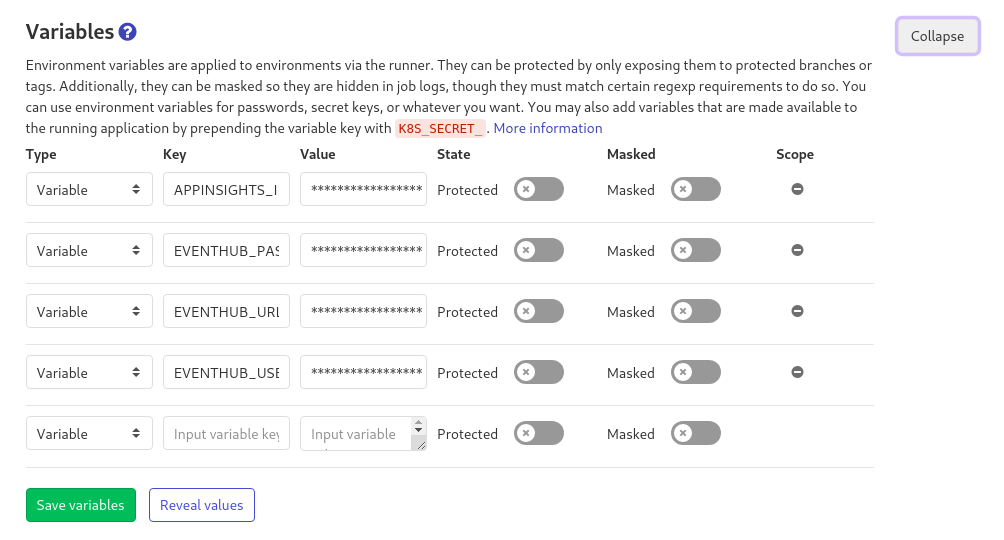
At Artistanbul, we started using Gitlab CI. While building our pipeline, the hardest part was managing environment variables. Gitlab’s interface makes it really hard:

Gitlab CI

Gitlabenv is a little command line application that makes managing this variables easier. It gets the current state from Gitlab, you modify the variables and it uploads your modified version to Gitlab.

It doesn’t support removing variables yet. I’ll add features as I need. If you see any issues or have feedback let me know.

Thursday, 23 May 2019

New project: Redmine CLI

I’m happy to announce my latest project Redmine CLI is available. It’s a command line interface for the project management and bug tracking software called Redmine that we use in Artistanbul.

You can install it via pip:

$ pip3 install --user redminecli

Also, I’m planning to make a RPM package for Fedora, so you will be able to install it with dnf in the near future.

To see examples of how to use redmine see the README.

Tuesday, 29 January 2019

My Bash History

This evening, I found ginh.sh on Changelog Weekly. It analyzes your shell usage patterns and generates a bar chart of them. I gave it a try, of course.

Home workstation

$ ./ginh.sh -f ~/.bash_history

entries=15, file=/home/egegunes/.bash_history, char==, len=145
--------------------------------------------------------------------------------------------------------------------------------------------------
    git ==================================================================================================================================== 2482
    vim ===================================================================================================================== 2213
     cd ================================================================== 1232
   make ===============================================  890
kubectl ====================================  677
 docker ============================  529
     ls ============================  522
     rm =======================  424
   pass ======================  401
     mv ================  290
  mkdir ==============  250
redmine ==============  248
    dnf ============  215
   curl =========  154
    ssh ========  149
--------------------------------------------------------------------------------------------------------------------------------------------------

Work laptop

$ ./ginh.sh -f ~/.bash_history

entries=15, file=/home/egegunes/.bash_history, char==, len=145
--------------------------------------------------------------------------------------------------------------------------------------------------
    git ==================================================================================================================================== 2552
    vim =============================================================================== 1530
     cd =====================================================  1027
   make ====================================  688
    ssh ==========================  503
     rm ==================  332
redmine ===========  211
vagrant ===========  210
     ls ===========  208
    dnf ===========  208
 docker =========  171
     mv =========  168
   pass =========  160
   mutt =========  159
kubectl ========  151
--------------------------------------------------------------------------------------------------------------------------------------------------

Takeaways

  • git and vim is leading by far on all my computers. Which is not that interesting.
  • I use kubectl and docker more at home.
  • There is not a single mutt at home? I use my phone to check emails at home, I guess…
  • There is more redmine at home than at work? Which is funny because we use Redmine for work! redmine is a CLI for Redmine which I wrote.